Issue codes by flat
Create a batch of activation codes, label each one by flat or unit, and choose how many vehicle registrations each code allows.
For blocks of flats, private estates, landlords and managing agents who want a clear way to register authorised vehicles and reduce permit administration.
Create a batch of activation codes, label each one by flat or unit, and choose how many vehicle registrations each code allows.
They enter the site code and activation code, then a name, address, phone number and registration for each permit.
See permits and resident details in the portal. Manage validity dates, suspend or cancel permits, and disable unused codes.
Illustrative example. A permit authorises a vehicle under the site’s rules; it does not reserve or guarantee a space.
Discuss your residential siteSuspend or cancel their permits and issue a new code for replacement tenants. Disabling a code alone does not cancel permits already issued.
The resident contacts the site manager so the old permission can be cancelled and a replacement issued. Self-service vehicle editing is not currently offered.
Discuss visitor durations and who can issue permissions. Staff can create suitable permits in the portal; the public activation-code journey is for resident permits.
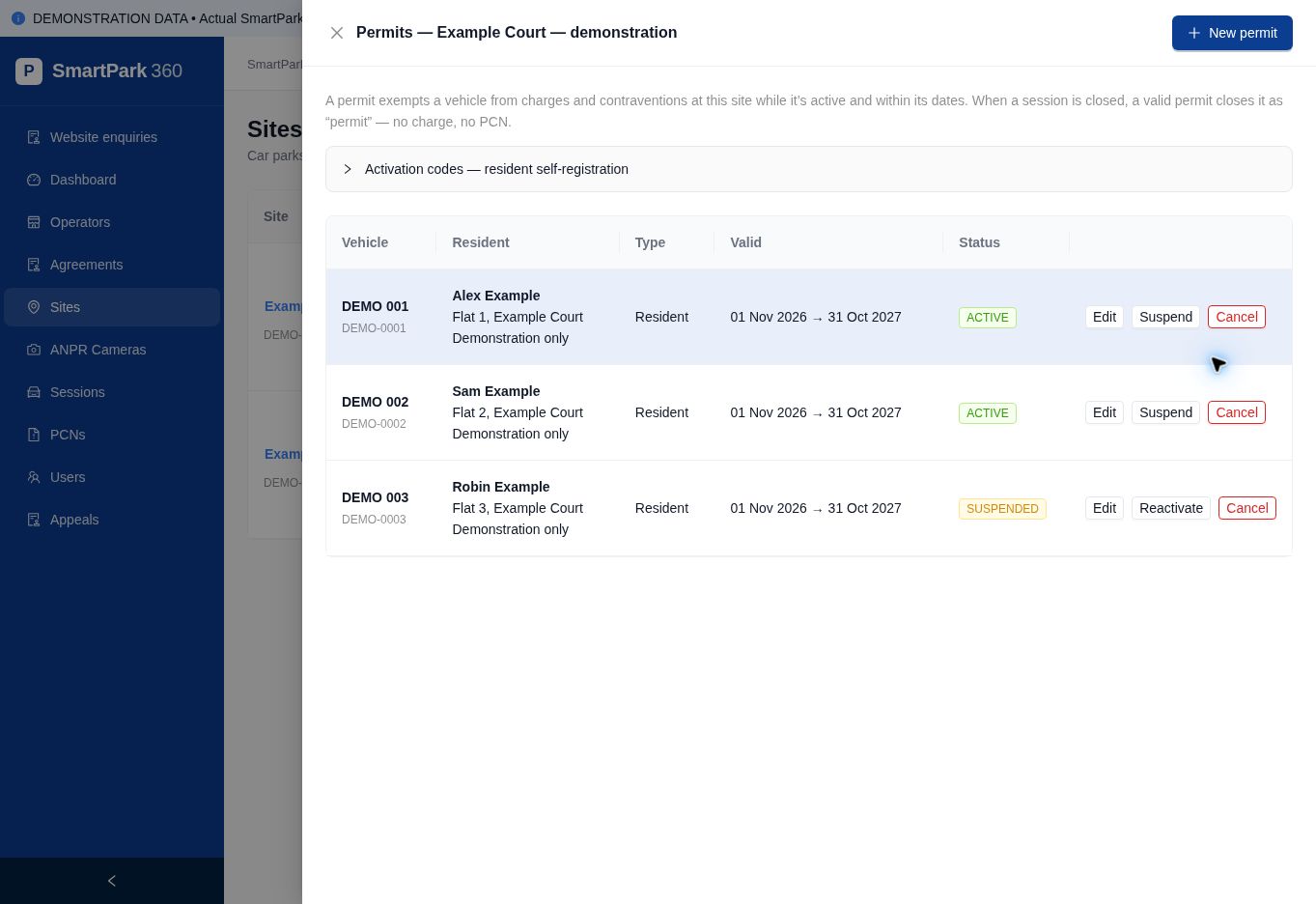
Review the registered vehicle, resident details, permit type, dates and status. Code batches show how many allocations have been used.
Codes can be downloaded as a CSV when generated, ready for your own resident communication.
See the walkthrough →Tell us how many flats and spaces you manage, and what is causing the most work.